Examine Metadata
See what your files say about you

Every photo your phone takes carries hidden information: often the exact spot where you took it, the phone that took it and the minute you took it. Documents carry the author's name and company. None of it shows when you open the file, and all of it goes along when you send it.
Examine Metadata shows you that information and removes it before the file leaves your hands. There are two apps. Both work entirely on your own device and never connect to the internet.
| Android | for photos on your phone: see what a photo gives away, then share a clean copy in one tap. Free for 3 photos, then a one-time $4.99. Coming soon to Google Play. |
| Windows | for any file on your computer: read, edit, scramble or remove every hidden field in photos, documents, PDFs and audio. $20, yours forever. Coming soon. |
Examine Metadata for Android
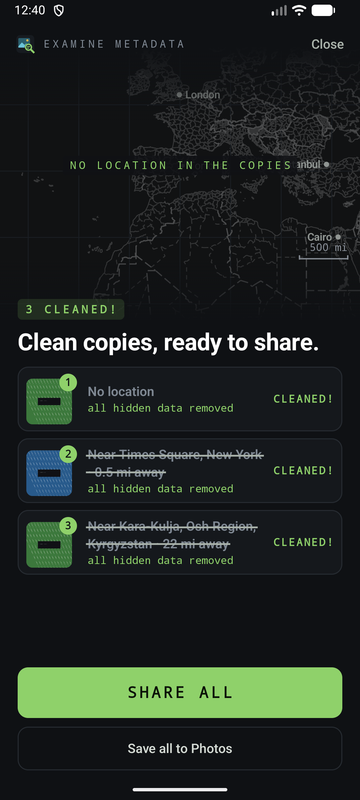
Share a photo to it from your gallery, or choose it in the app. You see where it was taken on a map drawn on your phone, which phone took it, when, and every hidden field. Then tap Sanitize & share: the app makes a clean copy, checks the copy, and hands it to the app you choose. Your original is never changed.
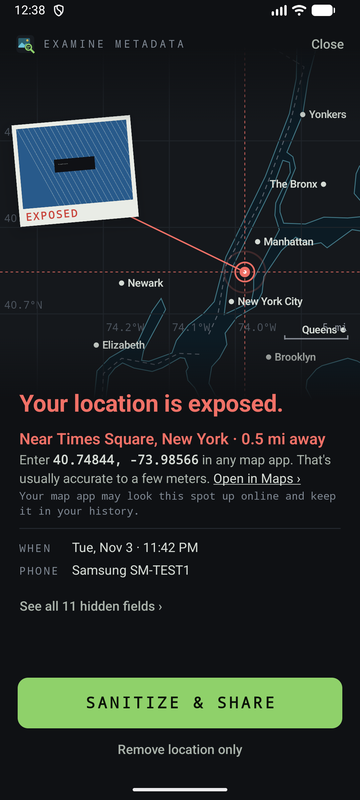
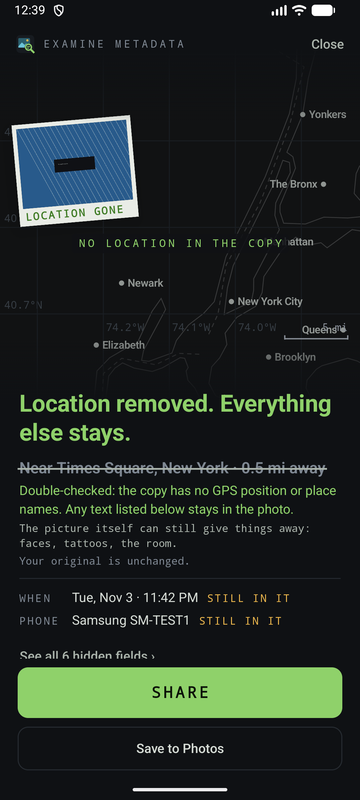
| See before you share | the exact spot on a map, how far it is from you, the time to the minute, the phone, and every other hidden field. |
| Sanitize & share | a clean copy without the hidden data, straight to messages, email or any app. Or save it to your photos. |
| Remove location only | takes out the position and place names and keeps the date and phone, when you want those to stay. |
| Checked, not assumed | the app reads each copy back before calling it clean. If something cannot be removed, it says so and keeps no copy. |
| No internet permission | no account, no ads, no tracking. Android does not let it connect to anything. |
| Formats | JPEG, PNG and WebP, and HEIC photos, saved as JPEG. AVIF on Android 12 or later. |
| Languages | more than 75, with distances in your own units. |
| Price | the first 3 clean photos are free. Then a one-time $4.99 unlocks every photo and several at once. No subscription. |
The picture itself still shows what it shows: faces, tattoos, the room. The app removes the hidden data, not what is in the picture.
Examine Metadata for Windows
For any file on your computer: photos, documents, PDFs and audio. Right-click a file, choose Examine metadata, and every hidden field is on screen, ready to read, edit, scramble or sanitize. Version 0.6.0, Windows 10 and 11.
Features
Everything below works on one file or on a whole selection at once.
| Sanitize, location only | remove GPS coordinates, altitude and place names, and keep camera settings and dates. |
| Sanitize, everything | remove all personal metadata the format allows: authors, comments, thumbnails, software names, editing history, cover art, tags. |
| Sanitize report | reads each file back after the change, lists every field removed and says whether anything is left. |
| Scramble | replace every writable field with random values in Hex, Unicode or Mixed style. Nothing is written until you save. |
| Edit any field | double-click a value to change it. Writable fields are listed first. |
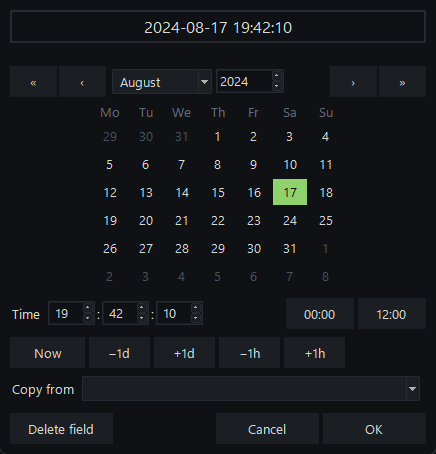
| Date and time picker | calendar, time spinners, ±1 day and ±1 hour buttons, and Copy from another date field. |
| Many files at once | select fifty photos, set the copyright once, save once. Fields that differ show multiple values. |
| Windows properties | the fields from Explorer's Properties > Details tab, editable in the same window, including created, modified and accessed dates. |
| Hundreds of formats | JPEG, PNG, TIFF, HEIC, camera RAW, PDF, Word, Excel, PowerPoint, OpenDocument, MP3, FLAC, MP4, MOV and many more, read by the bundled ExifTool engine. |
| Right-click menu | Examine metadata on files, folders and folder backgrounds in Explorer. |
| Keep backup | keep the untouched original, so Restore original can put it back. Off by default. |
| Field filter | type gps, date or author to narrow the list. |
| Keyboard shortcuts | F2 save, F3 discard, F4 add tag, F6 restore, F7 sanitize, F8 scramble. |
| Offline | no network connections, no account, no license server, no telemetry. |
Screenshots
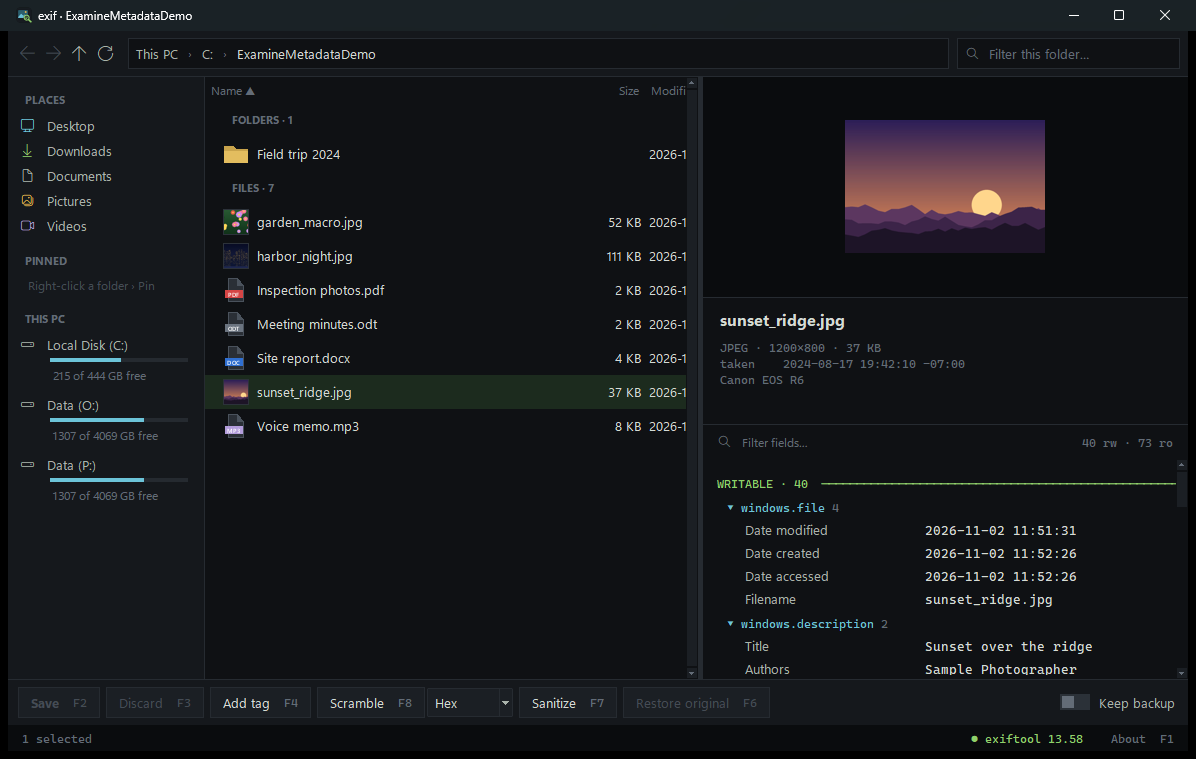
The main window. Files on the left, everything they know on the right.
Sanitize
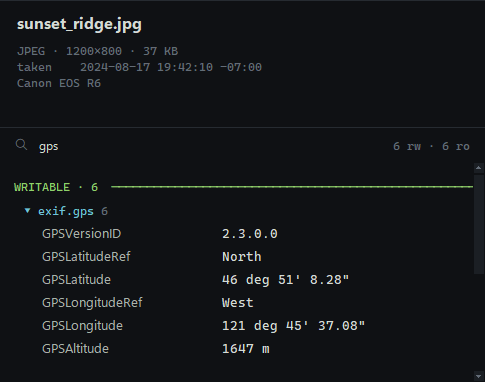
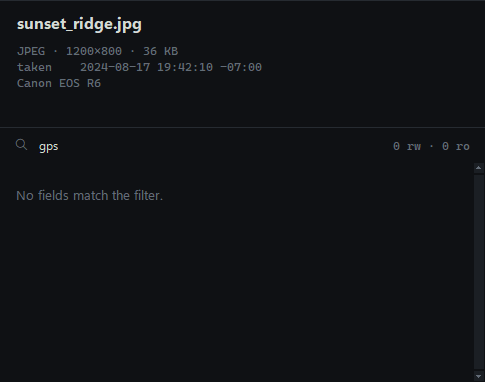
The same photo before and after Sanitize, location only, with the field filter set to gps. The camera, lens and date are untouched.
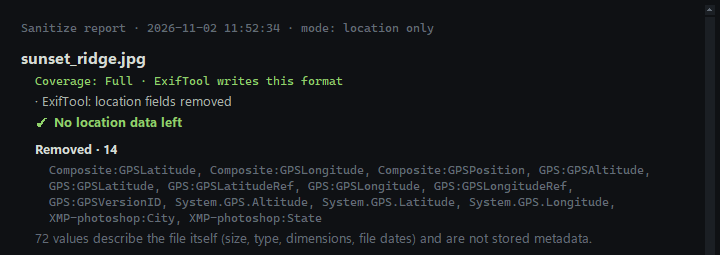
The report, written after reading the file back.
Scramble
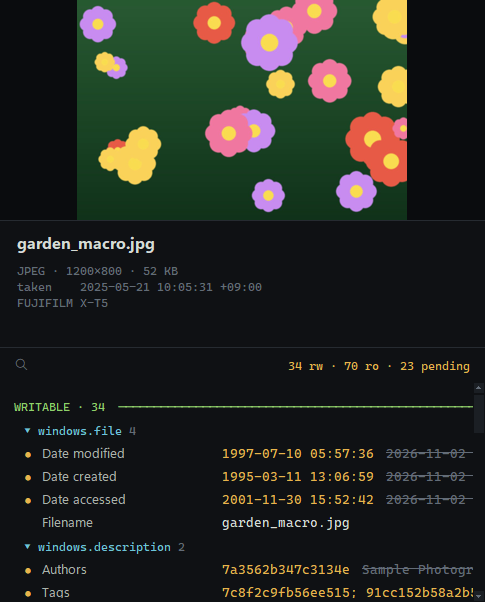
Editing dates
Many files at once
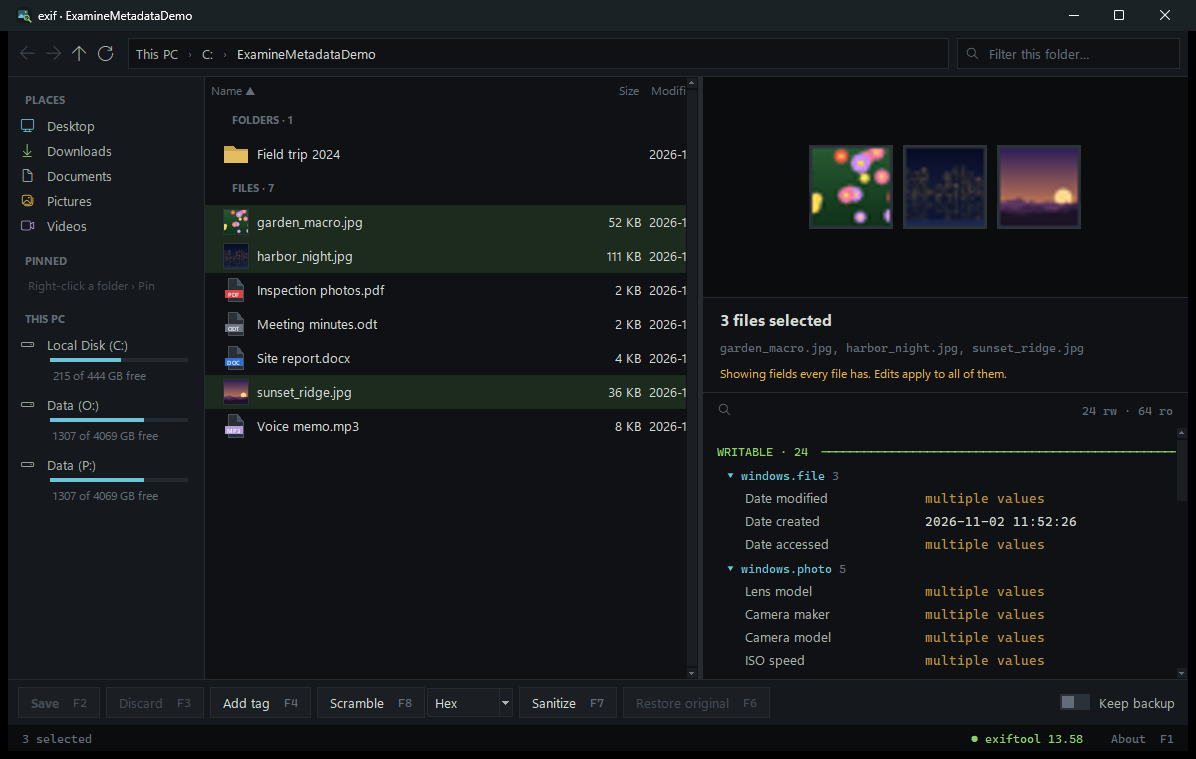
Three photos selected. Edits apply to all of them.
Sample photos
These three pictures are free to download. Each carries the kind of metadata a real camera or phone writes. Open one in any metadata viewer and look at what's inside.

Camera  Canon EOS R6
Lens    RF24-105mm F4 L IS USM
Taken   2024-08-17 19:42:10 -07:00
GPS     46.8523 N, 121.7603 W
City    Ashford

Camera  Apple iPhone 15 Pro
Lens    back triple camera f/1.78
Taken   2025-01-04 21:13:55 -05:00
GPS     40.7003 N, 74.0124 W

Camera  FUJIFILM X-T5
Lens    XF80mmF2.8 R LM OIS WR Macro
Taken   2025-05-21 10:05:31 +09:00
GPS     35.0116 N, 135.7681 E
Privacy
Neither app collects anything. The Android app has no internet permission, so Android itself stops it from connecting to anything; you can check that on its Play Store page. The Windows program makes no network connections: no account, no license server, no update check, no analytics, and its log records errors only, never file names. This web page sets no cookies and loads nothing from any other site.
Read the Android app's privacy policy.
Price
Perpetual license. Pay once. No subscription, no renewal, no account.
Install on up to 3 computers you own.
Coming soon.
| System | Windows 10 or 11, 64-bit |
| Disk space | About 100 MB |
| Install | Standard installer, no administrator rights needed. Uninstall from Settings > Apps. |
| Internet | Not needed after the download |
Questions
- Is there an iPhone or Mac version?
- No. There is an Android app and a Windows program.
- Do I need both?
- No. The Android app is for photos on your phone before you send them. The Windows program is for any file on your computer, and it can also edit fields, not just remove them.
- What happens after the 3 free photos on Android?
- You can still see what any photo gives away, for free and without limit. Making more clean copies, or several at once, takes the one-time $4.99 unlock.
- Can it damage my files?
- Photo, document and audio tags are written to a new copy that replaces the original only once it is complete, so an interrupted save does not leave half a file. But editing and sanitizing are meant to change files, and some changes cannot be undone. Turn on Keep backup, or work on copies, if you might want the original back.
- Does Sanitize get everything?
- It removes everything ExifTool and Windows can write in that format, and the report says plainly when a format has only partial coverage. File system dates (created, modified) belong to Windows rather than the file; you can set them, but not delete them.
- Is it a forensic tool?
- It is not certified as one. It shows far more than Explorer does, but if a file may be evidence, work on a verified copy.
- Do I get updates?
- Your license never expires, and the version you buy keeps working for as long as Windows runs it.
- Why does Windows warn me when I run the installer?
- The installer is not yet code-signed, so SmartScreen may say it doesn't recognize it. Choose More info, then Run anyway. The download page lists a SHA-256 checksum if you'd like to verify the file first.